CDU by Flight Deck Solutions - Review
/Pro Mx CDU by Flight Deck Solutions
The Control Display Unit (CDU) is the pilot interface to the Flight Management Computer (FMC). The FMC integrates with the Flight Management System (FMS) of the aircraft. The FMS contains the navigational database.
Historical Context
The first true FMC was introduced in 1984 with the release of the Boeing 737-300. In its most basic description, the FMC can be described as a computer that can store flight and navigation data and perform detailed and comprehensive assessments of the stored data, providing the pilot with up date information that is relative to safe and accurate flight.
Flight Management Computer (FMC) & Control Display Unit (CDU)
The CDU interface enables the flight crew to interact with the FMC and FMS to access, amougst other things: the navigational database, autopilot, flight director, auto-throttle and internal reference system (IRS).
An aircraft will only have one CDU installed, however, dependent upon company regulations, air safety and routing (flying over water), many operators will have two CDU units installed for redundancy and independent use by the Captain and First Officer. Think of the CDU as a keyboard to the FMC which in turn is a component of the FMS.
This said, the acronyms CDU and FMC are often used interchangeable in aviation parlance.
Flight Management System (FMS)
The FMS is an integrated system of which the FMC and CDU is just one component. The FMS is capable of four dimensional area navigation (latitude, longitude, altitude & time) while optimizing performance to achieve the most economical flight possible.
The FMS stores the navigation database and route information which the autopilot will fly when in LNAV mode. When given data such as YMHB & KSEA, it takes inputs from the fuel summation unit to give a gross weight and best speeds for take off, climb, cruise, descent, holding, approach, etc. These speeds can all be flown directly by the autopilot & auto-throttle in VNAV mode.
Flight Deck Solution's PRO Mx CDU
The CDU manufactured by Flight Deck Solutions (FDS) is an outstanding piece of simulation engineering. The unit is well built, solid, and replicates a real B737 style CDU 1:1.
The CDU body and bezel (front plate) is manufactured from high grade metal while the rear section that houses the electronics is plastic. A USB and VGA cable connects to the video card output on the computer. The connections to the cable are located on the rear of the unit allowing easy connectivity to the computer. The CDU has been painted in the correct Boeing grey colour and the paint has been applied professionally in several thin layers; the paint does not chip or wear off with use. Importantly, for those using genuine aviation parts, the unit is DZUS complaint and drops into the rails in the CDU bay with perfect precision. FDS includes four DZUS fasteners to allow connection to the rails.
High Fidelity Dimable Keyboard
The keyboard used in the CDU is made from high definition injection-molded plastic and the keys are dimpled and back-lit. The keys are very tactile and when depressed an audible click is heard ensuring you know the key has been depressed.
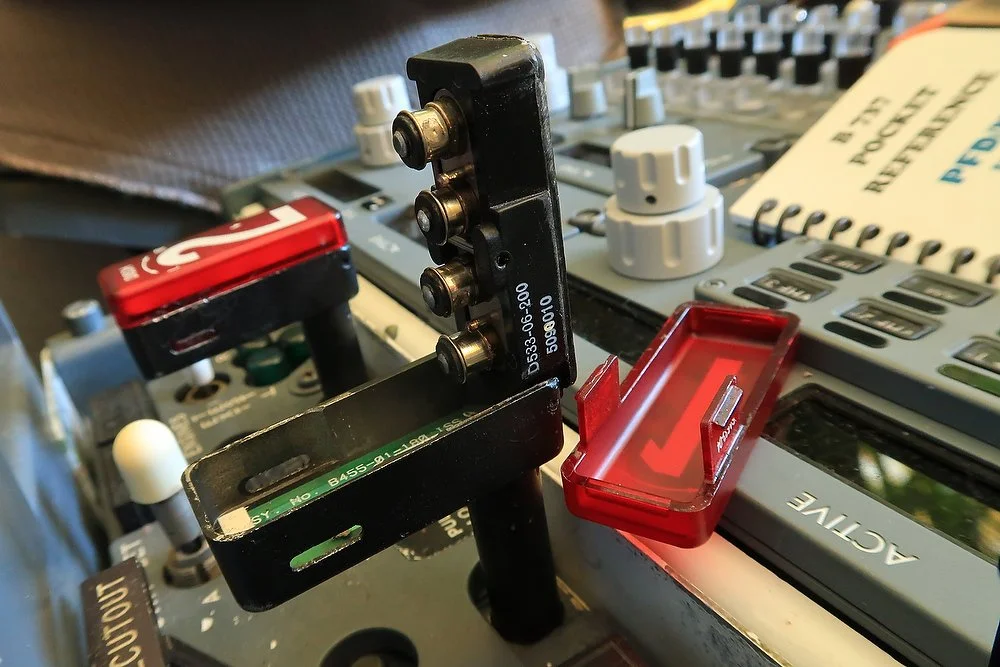
For night operations, the unit has a knob that can be rotated to dim the back-lighting brightness level of the keys. A functional metal carry bracket, that folds out from the edge of the bezel is also included. This replicates the carry handle on the real CDU.
Functionality - Software (Sim Avionics & ProSim737)
It is important to understand that the functionality of the CDU is not generated by software that comes bundled with the unit, but by the avionics suite you have chosen to use. Therefore, I have chosen not to discuss the various options that each software suite may or may not replicate. In the real world, airline companies have the opportunity to purchase specific options they believe are relevant to their flight operations. This said, many of the variations have been replicated in both software suites.
I have used the CDU with Sim Avionics and ProSim737; both software suites provide excellent functionality and work flawlessly with the unit.
The CDU is used throughout a flight; therefore, reliability is expected. The solid construction of the FDS CDU has not let me down and after endless pressing on keys they still function as you would expect them to.
The CDU at night showing only illumination from the unit. The backlighting is adjustable and able to be dimmed by turning the dim knob on the unit
Navigation Database
The unit does not ship with navigation data included. The navigational database which includes STARS and SIDS, Runways, airports must be purchased separately from Navigraph and then installed into your avionics software suite. Download and installation of the database is very easy and most of the installation is automated.
WOW Factor
The best feature of the CDU I have left to last – the display. 'WOW' is the only word to describe the display.
The display is a colour VGA display unit sporting 800 x 600 resolution. What this means is that the script on the display is VERY clean, VERY readable and VERY sharp. Being a colour display means that differing colours (white, green and magenta) can be used for the fonts that your avionics software generates. The use of colour helps distinguish between functions that are activated or in stand-by mode, not to mention enhancing the units display readability.
The display is equally distinguishable in full daylight and in darkness and does not exhibit screen cut off when viewed at an angle (as some laptop screens are prone).
Configuring the CDU
Configuring the CDU using Sim Avionics was relatively painless. You must designate which CDU you are installing (Captain, First Officer or Instructor), edit a few lines in the .ini file to ensure it recognises the correct CDU, and configure the display location. The only teething issue I had was ensuring that the monitor display window size was correctly positioned on the screen for the location of the CDU. It took quite a few attempts to get the position 'just right'.
The set-up with ProSim737 is equally straightforward, however, to ensure correct operation you must install and enable additional software supplied by ProSim737. Installing and initiating the software is relatively straightforward, however, it's important to follow the provided instructions to ensure trouble free operation.
Manual and Tuition
A manual explaining the functions of the CDU and/or tutorial is not included. In my opinion, FDS should develop a video tutorial that runs you through the basic functions of the unit including a simulated flight. This said, there are several dozen excellent tutorials that can be found on U-Tube that provide basic and advanced CDU use.
When you purchase the CDU a basic manual explaining the installation and set-up procedure is included..
The FMC Guide written and sold by Bill Bulfer is strongly recommended as this guide provides basic and advanced tuition in how to use the CDU. A review of the FMC Guide can be read here.
I cannot fault the CDU unit manufactured by Flight Deck Solutions and believe it to arguably be the best piece of reproduction hardware currently available.
Additional photographs of the Flight Deck Solutions CDU can been viewed in the image gallery.
My Rating 10/10
Please note that this review is not endorsed by Flight Deck Solutions (FDS) or by any other reseller.
A short video depicting some of the more commonly used keystrokes of the Flight Deck Solutions CDU. No particular key sequence has been followed. The video is to demonstrate the screen resolution and the uptake speed after depressing a key. Double click video to view full screen. Note that this video was produced using Sim Avionics software suite. ProSim737 software provides slightly different options.
Update
on 2016-01-10 23:27 by FLAPS 2 APPROACH
The CDU was purchased in February 2012 and has seen solid use to January 2016 in both Sim Avionics and ProSim-AR avionics suites. During this time, the unit has worked perfectly.
For any reproduction item to operate over a four year period without any problems, can only support my view that Flight Deck Solutions (FDS) produces high quality hardware that has not been designed to fail after a short period of time.